You've got content. What you don't have is a good way to decide what to do with it.
Courses you built. PLR you bought because it was exactly right at the time. Workbooks, templates, presentations, client tools you used twice, or even blog posts and videos you've published. Some of it's in Drive, some in Dropbox, some online, some in a folder called Downloads.
Storage is for keeping things. It was never meant for working.
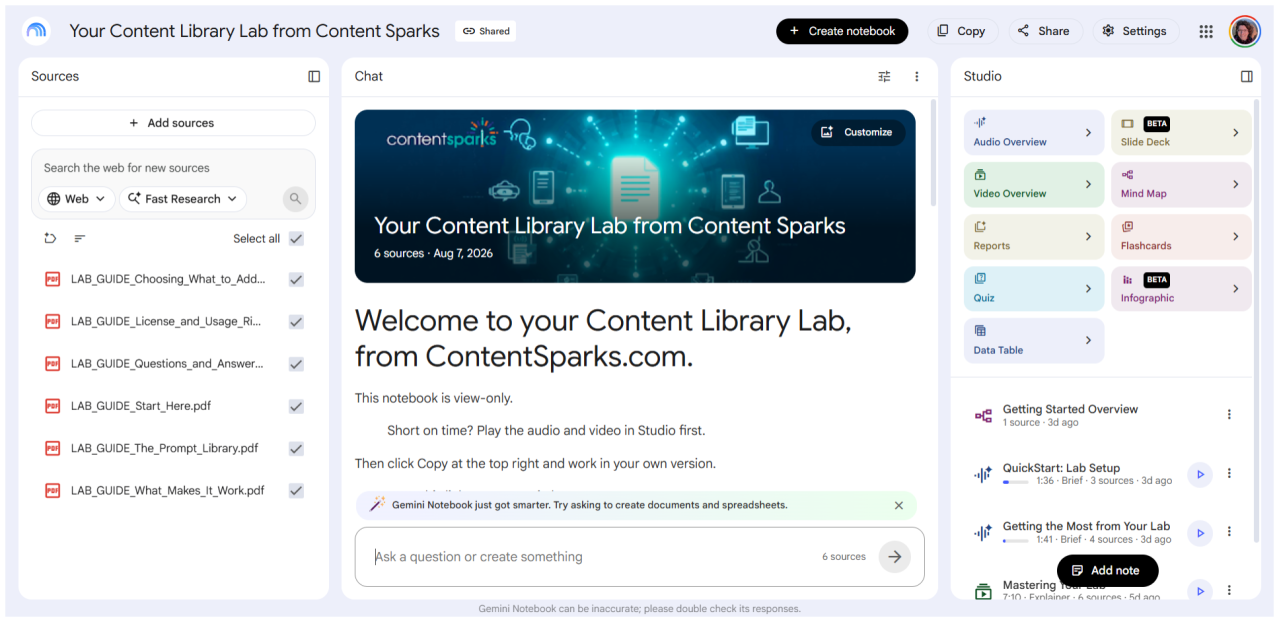
Your Content Library Lab is where you bring your content together, see what you’ve got to work with, and build from it.
And it'll tell you when something won't hold up, before you build it.
Ask what's in there on a topic, what overlaps, what's thin, what's dated.
Ask it to turn a module into a lead magnet, 10 blog posts into an ebook, or four scattered pieces into one workshop. It drafts it all with you.
You can even have it generate slides, documents, video, audio, infographics, and other media to go with it.
Every answer comes only from the sources you added, so nothing is made up on its own.
The Content Library Lab
Turn what you own into whatever you need next
You'll get:
- Your own Content Library Lab, yours to keep
- An assistant with five working modes
- Six built-in guides, with ready-made ways to ask questions
- Quality checks that catch weak ideas early
- Media generation from your own content
- Lifetime access to every improvement I make
Introductory Price: $97
Your price: Only $67 (with coupon)
Use coupon: LAB67EXT
Runs on a free or paid Google account
You'll get instant access to your Content Library Lab inside the Content Sparks Learning Center.
Follow the short setup instructions there. One click to make your Lab copy. One copy/paste to finish your setup. No software or apps to install.
Take a peek inside your Lab
Want to see how it works before you buy?
In this short walkthrough, I'll show you just a few ways you can work with your content inside the Lab.
Couldn't you just build this yourself?
You could load some files into a free notebook and ask questions. That part's easy.
The hard part is knowing what to tell it and ask it.
I spent weeks on the instructions that make this Lab behave. They're what keep it consistent, and what stop it from agreeing with you when it shouldn't.
I've baked 30 years of course creation into it.
So it won't hand you something that reads well and does nothing. You know the ones:
- Twelve pieces that explain and none that ask the reader to do anything, so they either drop out or never take action.
- The freebie so big it exhausts people before they reach your offer.
- The assessment that gives a result and no next step, so it gets read once and forgotten.
Your Lab catches those types of failure points before you build.
Load your library this afternoon, and you could have it mapped, your gaps named, and your next piece drafted by tonight.
How you'll use it
Everything happens in one place. Pick a mode for what you came to do.
Audit what you have
- Finds what you have on any topic, across every file, video, or web page
- Tells you which pieces fit a purpose or an audience
- Flags where two pieces overlap, and whether that's a problem
You walk away knowing what's in your library and what each piece is good for.
Find the gaps
- Identifies what's weak or absent and why
- Tells you when something you already own could be adapted instead
- Names the format that would close each real gap
You walk away knowing exactly what you need to create or find.
Build what you need
- Sorts your content by the job each piece does
- Says which pieces are ready and which need rework
- Puts them in order and drafts with you, working only from what you give it. No hallucinations.
You walk away with a plan and a first draft.
Plus there's a setup mode to get started and a reset to change direction. Your Lab suggests what to ask next, so you're never staring at an empty chat.
Come back next week for something else entirely. Your content stays where you left it.
Duplicate your Lab and you start fresh with the same sources you added. You choose what to use.
From your content, in whatever format you need
Audio overviews, or a podcast-style conversation you can interrupt with your own questions. Video in the style you choose. Slides, documents, infographics, mind maps, quizzes, flash cards, and reports from a briefing doc to a study guide to a blog post.
All generated from your own sources. Google keeps adding more.
Who this is for
This is for you if you have content and want more from it.
Coaches, consultants, course creators, service providers, or anyone with:
- An idea or plan you're ready to work on, and content you want to build it from
- Courses, workshops, workbooks, blog posts, videos, and audio you've created over the years
- PLR and licensed content you bought and haven't fully used
- Client tools, templates, and frameworks scattered across folders
- Material on the same topic in three different products, and no quick way to see it
- A newsletter, a program, or an offer that needs content you're sure you already have
Starting with one course or workbook? That's plenty. There's a lot you can pull out of a single product, and everything you build from it goes back into your Lab for next time.
Been at this twenty years? Then you already know what it's like to lose track of your own work. The bigger your library, the more there is to find.
What it won't do
You’re the one in charge:
- It won't make your decisions. It'll tell you what your content supports and where a plan falls down. You still choose. No AI tool should be doing that part for you.
- It won't finish the job. Design, delivery, sales setup, and the last polish still happen in your own tools.
- It won't make things up. It drafts with you, from your own material. When a piece needs a story or a client result that isn't in your sources, it'll say so and ask you for it.
Looking for done-for-you content instead? That's what the Content Sparks shop is for. Buy it there, then bring it into your Lab.
Sharyn Sheldon
Founder of Content Sparks | Instructional Designer | PLR Course Creator

Why I built this
I've spent more than 30 years creating training programs, business courses, and brandable content for coaches, consultants, course creators, and trainers.
In that time I've watched a lot of good material go nowhere. It sits in a folder while its owner starts something new from scratch.
My customers kept telling me the same thing. They had plenty. They just couldn't get at it.
So I built the Lab I wanted for my own library. Somewhere to work through what I already had.
The quality checks are something you won't find elsewhere. They're the questions I'd ask if you sent me your plan.
What people say about working with Content Sparks

"I've been an ongoing Content Sparks customer for over four years, and honestly, it's one of the best investments I've made in my business. What I love most is how thoughtfully everything is designed."
Lainey Lien, CPC
Executive and Leadership Development Coach & Trainer
Frequently Asked Questions
Why wouldn’t I just use an AI chat tool?
You could, and I'm not going to tell you to stop using your favorite chat assistant. For one project with a handful of files, a chat works fine.
It gets harder with a big library. Your material ends up split across separate projects, so nothing can look at all of it at once. Load too much into one traditional chat and it slows down, drifts off course, and costs more every time it reads back through everything.
Gemini Notebook is built for the other situation. Many sources, kept together, ready to work from when you are.
How does this relate to your Offer Focus AI System?
They do different jobs, and neither one needs the other.
Offer Focus works from what you tell it. You answer questions about your business, and it walks you through a framework to a decision, with a stopping point.
Your Lab works from what you own. You load the actual files and work with them. It's fine to use when you haven't decided anything yet. It just won't march you to a decision the way Offer Focus does.
If you've been through Offer Focus, your Lab is where you build what you decided on. Add your Offer Focus Map as a source, and it'll work from that too.
I have a huge library. Will it all fit?
A free Google account currently allows 50 sources per notebook and 50 notebooks. That's a lot of room, and paid plans allow more if you need it.
You don’t need to load everything. You add the content for what you're working on, and you can set up separate Labs for different topics or parts of your business.
Tip: Keep your content in Google Drive, and adding sources takes seconds. You can also upload straight from your computer.
Do I need to pay for anything else?
No. Your Lab runs on a free Google account. Paid Google plans give you more room and higher limits, but the Lab doesn't require one.
Is this PLR? Can I share it or sell it?
No. Your Lab is for your own business use. You can't share the link, resell it, or rebrand it.
Content you add keeps its own terms. Content Sparks PLR stays under the Content Sparks license, PLR from other sellers follows their rules, and your own material is yours. Your Lab has a full guide on this and will answer licensing questions from it.
What if you improve the Lab later?
You get every improvement, free. I'll email you when something changes and tell you what you need to do.
How long do I have access?
Your copy is yours to keep. It lives in your Google account, not mine, so nothing expires and there's no subscription.
What is the refund policy?
No refunds on this one. Your Lab is a notebook you copy into your own Google account, so once you've opened the link, you have it permanently, and there's no way to return it.
If you're not sure it fits how you work, email: sharyn@contentsparks.com
I'd rather answer your question than sell you something that isn't right.
You already own the content. Now it’s time to use it.
With the Content Library Lab, you’ll get:
- Your own workspace
- 5 working modes and 6 built-in guides
- Quality checks that catch weak ideas early
- Media generation from your own content
- Lifetime access to every improvement